


Hey there, fellow Claude Code users! If you’ve ever found yourself caught off guard by hitting your ChatGPT-like AI limits during a crucial coding session, you’re not alone. That sudden “hour’s up” alert can really disrupt your flow—and who has time for that these days? This week, let’s talk about a new macOS menu bar app called Usagebar, designed precisely to prevent those frustrating interruptions by keeping you in the know about your Claude Code usage at all times.
Why Usagebar Might Be Your New Best Friend
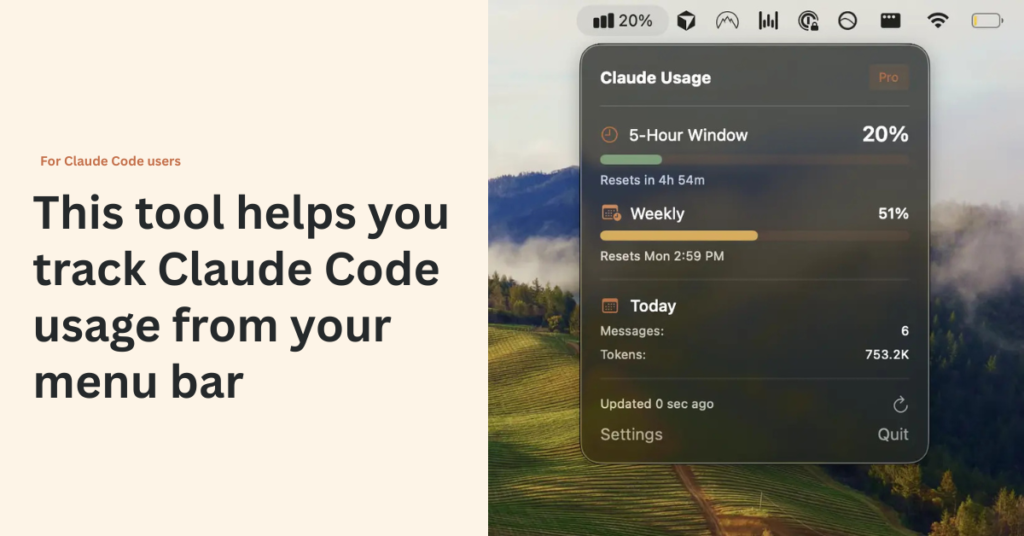
UsageBar sits quietly in your Mac’s menu bar and keeps track of your five-hour and weekly Claude Code session limits. No more hopping between tabs, digging through dashboards, or guessing when your access resets. With just a glance, you can see exactly how much of your AI “fuel” is left, helping you avoid that dreaded lockout.
But it’s not just passive tracking. Usagebar sends friendly notifications at 50%, 75%, and a crucial 90% usage threshold. That last alert is a lifesaver: it nudges you to wrap up your current work before your access temporarily freezes. Imagine: no more getting blindsided in the middle of writing a PR or troubleshooting a bug.
Smart Features for Smarter Workflows
One of the things I appreciate about Usagebar is the subtle encouragement to adapt your workflow. Running low on your Claude Code minutes? Instead of hitting an abrupt stop, you can switch to lighter AI tools like Sonnet or Haiku to finish smaller tasks, saving your Opus access for those heavy-duty moments. It’s like having an on-the-fly game plan for managing your AI resources.
Usagebar also respects your privacy and security by using your existing Claude Code credentials securely through Apple’s Keychain. No extra passwords, no complicated setups—just smooth, seamless integration that feels like part of your everyday Mac experience.
“Nifty tool—helps me quickly optimize usage”—Joel Lee (@j0)
Who Is UsageBar Made For?
Developers who rely on Claude Code daily will find Usagebar a practical companion. If you like staying in your flow, hate unexpected service lockouts, and prefer keeping your tools tidy and within reach, this app is definitely worth a look.
Best of all? Usagebar adopts a “pay what you want” model with instant downloads. So you can try before fully committing or contribute as you see fit.
Wrapping Up
If managing your Claude Code usage feels like juggling flaming torches, Usagebar hands you a handy little helper to keep those flames under control—calm, steady, and uninterrupted. This kind of tool empowers you to make smarter choices, stay focused, and avoid the frustration of unforeseen downtime.
Make sure to keep an eye out next week when we dive into some creative ways developers are combining different AI tools into seamless workflows. Until then, don’t hesitate to chip in your own tips or questions—we’re all in this together!
Try Usagebar at: www.usagebar.com